
Smart IPTV on Fire Stick: Download the App & Set It Up (2026)
This guide may contain affiliate links. If you buy through them we may earn a commission at no extra cost to you. As an Amazon Associate I earn from qualifying purchases. Learn more.
Lessons 6 of 13
Quick Overview: Smart IPTV (SIPTV) is a simple IPTV player that you can install on Fire Stick from the developer’s official download address. Unlike most players, you add your playlist on the Smart IPTV website using your device’s MAC address. In this lesson you install the Smart IPTV app on Fire Stick, upload your playlist, and learn when another player is a better choice.
Smart IPTV has been around for years and became popular on Samsung and LG TVs. Its biggest strength is the setup, because you type your playlist link on a computer or phone instead of with the remote. On the other hand, it is more basic than players such as TiviMate. For that reason, read the comparison at the end before you pay for activation.
Good to know: Smart IPTV is only a player. In other words, it has no channels, and you need a playlist from a licensed IPTV service.
What you need
- A Fire TV running Fire OS with Downloader installed (the 4K Select and other Vega OS models cannot install it)
- An M3U playlist link or file from your IPTV service, for example from a free IPTV trial
- A phone or computer to upload the playlist
- For long-term use: the one-time activation fee (5.49 EUR per device at the time of writing)
Step 1: Download Smart IPTV on Fire Stick with Downloader
- First, open Downloader on your Fire TV.
- In the address bar, type apk.siptv.app and select Go. This is the official download address listed on the developer’s Android and Fire TV instructions.
- When the download finishes, select Install, then Done.
- Finally, select Delete to remove the installer file and save space.
Avoid copies of Smart IPTV from other websites, because they are often outdated, and you cannot be sure what they contain.
Step 2: Open the app and note your MAC address
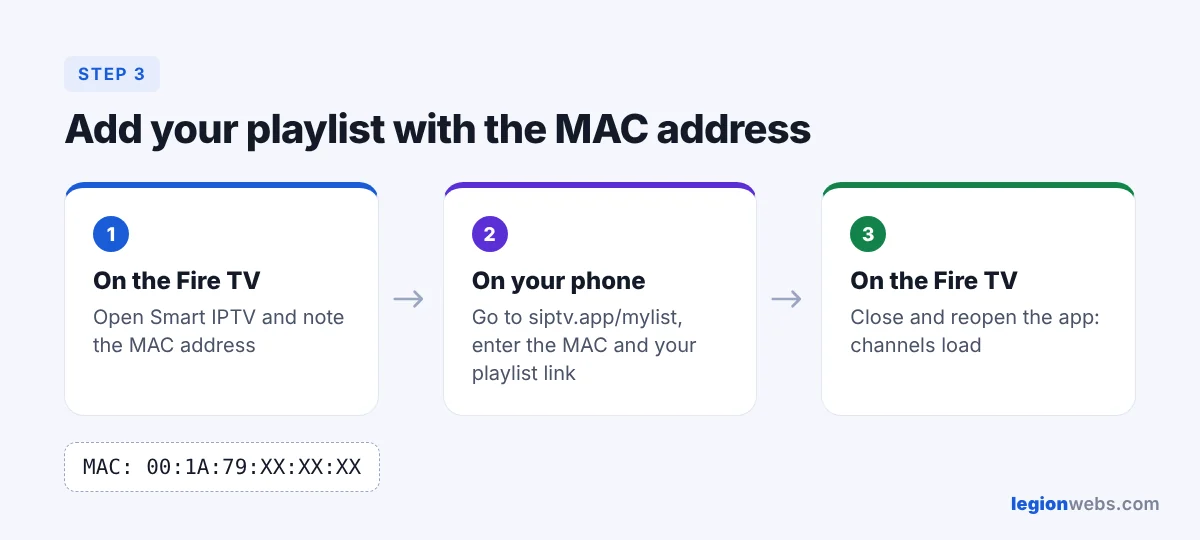
Open Smart IPTV from Your Apps & Channels. The start screen shows a MAC address, a code made of six pairs of letters and numbers. Write it down or take a photo with your phone. In fact, this code links your Fire TV to your playlist and your activation.
Step 3: Upload your playlist on the Smart IPTV website
- First, on your phone or computer, go to siptv.app/mylist.
- Enter the MAC address from your Fire TV.
- Paste your playlist URL (M3U link), or upload the playlist file.
- If your service gave you a TV guide link, add it in the EPG field, or tick Detect EPG.
- Then submit the form and wait for the confirmation.
- On the Fire TV, close Smart IPTV completely and open it again. As a result, your channels now load.
Tip: leave Save online unticked unless the app runs out of memory with a very large playlist. The website explains each option next to the form.
Step 4: Activate Smart IPTV
Smart IPTV starts as a trial, and the app shows how much trial time is left. After that, to keep using it, pay the one-time activation for your device on siptv.app/activation with the same MAC address. However, activation covers the app on that device only, and it never includes channels. Activate before the trial ends so your playlist stays in place.
Step 5: Watch Smart IPTV on your Fire Stick
- To begin, press Select to open the channel list, and the arrow keys to switch groups.
- Next, press Menu (three lines) on the remote for app settings, such as aspect ratio and the player options.
- If a channel stutters, follow How to Fix IPTV Buffering on Firestick.
Smart IPTV vs other players on Fire Stick
| Smart IPTV | TiviMate | IPTV Smarters Pro | |
|---|---|---|---|
| Add playlist | On the website with MAC | In the app (Xtream or M3U) | In the app (Xtream or M3U) |
| Price | One-time per device | Free, Premium optional | Free |
| TV guide | Basic | Excellent | Good |
| Movies & series | Basic | Good | Very good |
| Best for | Simple live TV, same app as your Samsung/LG TV | Live TV with a real TV guide | Movies and series |
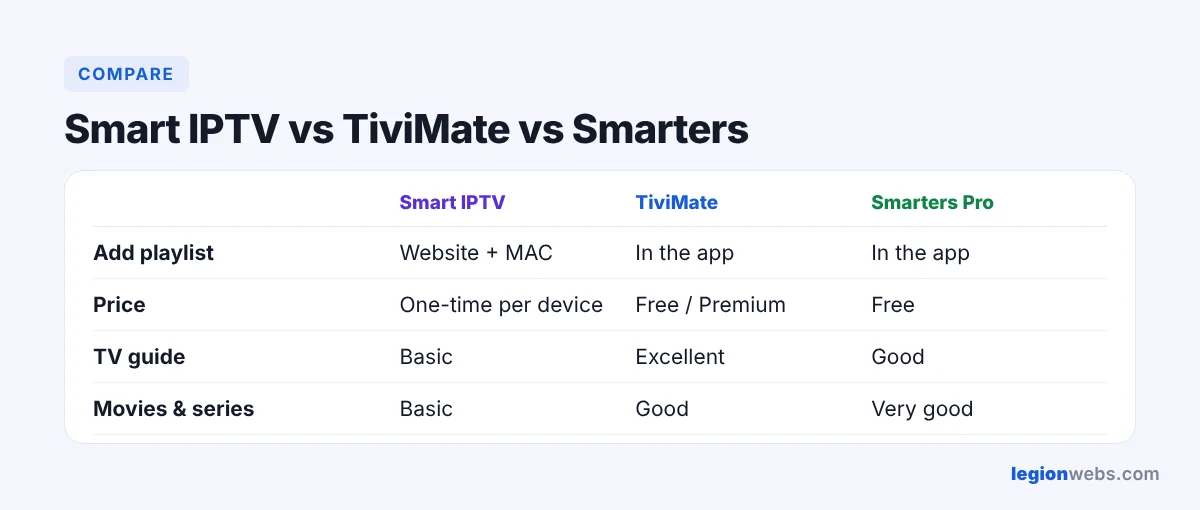
In short, Smart IPTV is a good pick if you already use it on your smart TV and want the same simple app on your Fire Stick. If you want a richer TV guide, see TiviMate on Firestick; for movies and series, see IPTV Smarters Pro.
Smart IPTV on Fire Stick: troubleshooting
| Problem | Fix |
|---|---|
| Downloader cannot open apk.siptv.app | Check the spelling, then try again later. Make sure Downloader has the Install unknown apps permission. |
| The website says the MAC address is invalid | In that case, retype it from the app’s start screen. Letters and numbers like 0 and O are easy to mix up. |
| Channels do not appear after uploading | First, fully close the app (Force stop in Manage Installed Applications) and open it again. |
| No TV guide | Instead, add the EPG link from your provider on the mylist page, or tick Detect EPG. |
| “Trial expired” message | Activate on siptv.app/activation with the same MAC address. |
If you prefer an app with a one-time activation, the IBO Player Pro setup guide from 8K IPTV Group explains how to install it and add your playlist.
Frequently Asked Questions
Is Smart IPTV free on Fire Stick?
Yes, at first you can try it for free. After the trial, it needs a one-time activation per device. There is no monthly fee for the app.
Does Smart IPTV come with channels?
No. It is a player only, so you add a playlist from your own IPTV service.
Can I use Xtream Codes login with Smart IPTV?
Smart IPTV works with playlist links and files. Fortunately, most services can give you an M3U link that contains your login. If your provider only gives Xtream Codes details, TiviMate or IPTV Smarters are easier.
Does one activation work on my TV and my Fire Stick?
No. In other words, activation is linked to one device’s MAC address, so each device needs its own.
What’s next
Now that Smart IPTV on Fire Stick is ready, make streams smooth with How to Fix IPTV Buffering on Firestick, or compare all players in Best IPTV App for Fire Stick.