
IPTV Glossary: Every IPTV Term Explained in Plain English (2026)
This guide may contain affiliate links. If you buy through them we may earn a commission at no extra cost to you. As an Amazon Associate I earn from qualifying purchases. Learn more.
Lessons 7 of 8
Quick Overview: This IPTV glossary explains the words you meet when you set up and use IPTV, in plain English. The terms are grouped by topic: the basics, logins and playlists, the TV guide and features, picture and streaming quality, devices and apps, and accounts. Each entry links to the lesson that shows it in action, so you can bookmark this page and come back whenever a word is unclear.
IPTV comes with a lot of jargon. Providers send “M3U links” and “Xtream logins”, players ask for an “EPG URL”, and forums talk about “anti-freeze” and “connections”. As a result, new users often get stuck on the words before they ever get to watch anything.
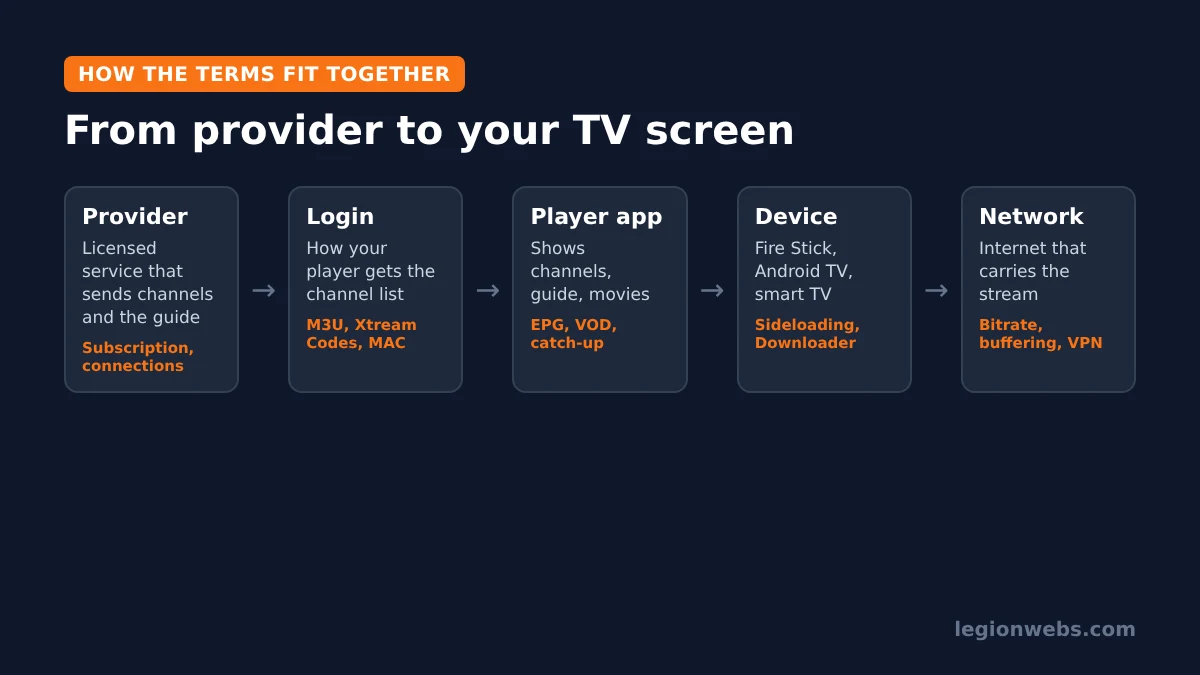
This IPTV glossary fixes that. First, the diagram below shows how the main pieces fit together. Then each section explains the terms in that area.
IPTV glossary: the basics
| Term | What it means |
|---|---|
| IPTV | Internet Protocol Television: TV channels delivered over the internet instead of cable, satellite or an aerial. See what is IPTV. |
| IPTV provider | The company that supplies the channels, movies and guide. In other words, you pay the provider, not the player app. Always choose a licensed service. |
| IPTV player | The app you watch in, such as TiviMate or IPTV Smarters. However, it has no channels of its own; it only plays what your provider sends. |
| OTT | “Over the top”: any video service delivered over the internet, such as Netflix. For that reason, IPTV is often grouped under OTT. |
| Live TV | Channels that play in real time, like regular broadcast TV. |
| VOD | Video on demand: movies and series you can start whenever you want. |
| Free trial | A short test period, often 24 to 48 hours, to check a service on your device before paying. |
IPTV glossary: logins and playlists
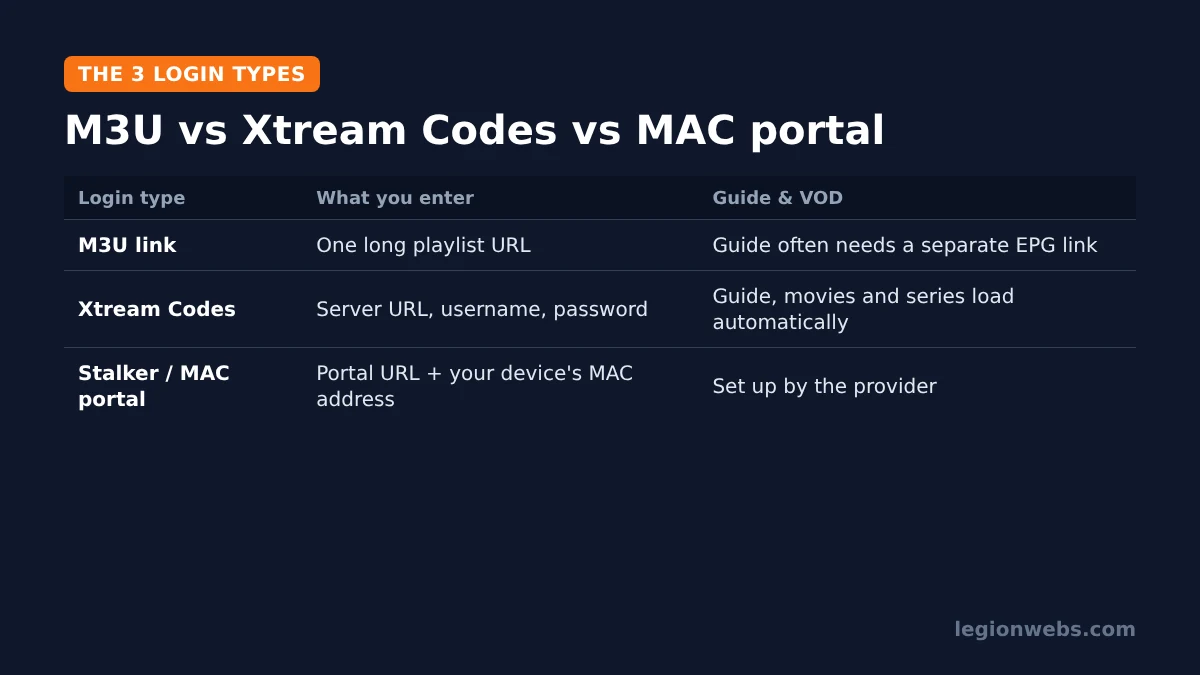
Your provider sends your channels in one of three formats. Which one you get decides what you type into your player, so this part of the IPTV glossary matters most.
| Term | What it means |
|---|---|
| Playlist | The list of channels (and often movies and series) that your provider gives you. |
| M3U / M3U8 | A playlist file format. Providers usually give you an M3U link: one long web address that contains your whole channel list. |
| Xtream Codes (Xtream API) | A login made of a server URL, username and password. It loads channels, the guide, movies and series automatically. See M3U vs Xtream Codes. |
| Server URL / portal URL | The web address of your provider’s server, entered together with your username and password. |
| Stalker portal / MAC portal | A login that uses your device’s MAC address instead of a password. Then, the provider links the portal to that address. |
| MAC address | A unique hardware ID for a device’s network connection. MAC-based apps show it on screen so you can send it to your provider. |
| Channel group / category | A folder of related channels, such as “UK Sports” or “News”. For example, hiding groups you never watch makes the guide faster. |
IPTV glossary: TV guide and features
| Term | What it means |
|---|---|
| EPG | Electronic program guide: the TV guide grid that shows what is on now and next. See how to add EPG to IPTV. |
| XMLTV | The file format most EPG data uses. An “EPG URL” usually points to an XMLTV file. |
| EPG time shift | A setting that moves the guide forward or back by whole hours when it does not match your time zone. See EPG not loading. |
| Catch-up (archive) | Lets you watch shows that already aired, usually for a few days back. Still, it only works on channels where your provider offers it. |
| Recording (PVR/DVR) | Saving a live programme to watch later. For instance, some players, such as TiviMate Premium, include it. |
| Multiview / multi-screen | Watching several channels on one screen at the same time. |
| Favourites | Your own short list of channels for quick access. However, favourites stay inside one app and do not transfer to another player. |
| Parental control | A PIN lock on channels or categories you want to restrict. |
Picture and streaming quality
| Term | What it means |
|---|---|
| SD / HD / FHD / 4K | Picture resolution, from standard definition up to 4K (UHD). Naturally, higher resolutions need faster internet. |
| Bitrate | How much data a stream uses each second, measured in Mbps. As a result, a higher bitrate usually means a sharper picture. |
| Buffering | Pauses while the player waits for more data. See how to fix IPTV buffering. |
| Anti-freeze | A marketing term providers use for servers or settings that aim to reduce freezing. However, it is not a standard feature, so results vary. |
| Buffer size | How much video a player loads ahead. Generally, a larger buffer can smooth out short drops but adds a small delay. |
| HEVC (H.265) | A video compression format that gives similar quality at a lower bitrate. However, your device must support it. |
| Latency | The delay between the live event and what you see. For example, IPTV is often a little behind broadcast TV. |
IPTV glossary: devices and apps
| Term | What it means |
|---|---|
| Fire OS / Vega OS | The two systems on Amazon Fire TV devices. In particular, Fire OS allows apps from outside the Appstore; Vega OS does not. See Vega OS Fire TV. |
| Sideloading | Installing an app from outside the official app store, for example with Downloader on a Fire Stick. |
| APK | The installer file for an Android app. In short, you download an APK to sideload an app. |
| Downloader | A free app used to download and install APKs on Fire TV. See install Downloader on Firestick. |
| Unknown sources | A setting you must allow before a device installs sideloaded apps. |
| Set-top box (STB) | A small box that connects to your TV, such as an Android TV box or a MAG box. |
| Smart TV app | An IPTV player installed directly on a TV, such as on Samsung or LG. See IPTV on Samsung and LG. |
Account and network terms
| Term | What it means |
|---|---|
| Connections | How many devices can stream at the same time on one subscription. Therefore, exceeding it usually stops one of the streams. |
| Expiry date | When your subscription ends. Fortunately, many players show it on the account screen. |
| Reseller | A business that sells subscriptions from a larger provider under its own name. |
| VPN | A service that encrypts your connection and routes it through another server. See install a VPN on Firestick. |
| ISP throttling | When an internet provider slows down certain traffic, which can cause buffering at busy times. |
| Mbps | Megabits per second, the unit for internet speed and stream bitrate. |
How to use this IPTV glossary
You do not need to learn every word. Instead, start with the three that matter on day one: your login type (M3U, Xtream Codes or MAC), EPG and connections. After that, the rest makes sense as you use your player.
If a provider uses a word that is not listed here, ask them to explain it before you pay. In addition, be careful with services that promise “every channel” for very little money, because licensed IPTV services are clear about what they offer. Our guide on how to choose an IPTV service explains what to look for. For a wider background on the technology, see the Internet Protocol television article on Wikipedia.
Frequently Asked Questions
What is the difference between an IPTV provider and an IPTV player?
The provider supplies the channels; the player is the app that shows them. You need both, and you can use the same provider in different players.
Which login type should I ask for?
Xtream Codes is the easiest in most players, because the guide, movies and series load automatically. Otherwise, use M3U if your player does not support Xtream logins.
Is IPTV legal?
IPTV technology is legal and widely used by TV companies. What matters is the service: use providers that are licensed to offer their channels.
What’s next
- New to IPTV? Start with what is IPTV.
- Pick a player: TiviMate vs IPTV Smarters.
- Set it up: IPTV on Firestick.
Free download
Firestick + IPTV Setup Checklist
Two printable pages: install, login, the settings that make it faster and quick fixes for buffering and an empty guide.
We'll send occasional new guides. No spam, unsubscribe any time. Privacy