
What Is IPTV? How It Works, What You Can Watch & Is It Legal
This guide may contain affiliate links. If you buy through them we may earn a commission at no extra cost to you. As an Amazon Associate I earn from qualifying purchases. Learn more.
Lessons 1 of 5
Quick Overview: What is IPTV? IPTV (Internet Protocol Television) means watching TV channels, movies and series over the internet instead of through a cable, satellite or antenna. In this lesson you learn how IPTV works, what you can watch, what picture quality to expect, and how to tell a legal service from a risky one.
You probably use IPTV already without calling it that. For example, when you watch live TV in an app such as YouTube TV, Sling or Pluto TV, the picture reaches you over the internet. That is IPTV. In short, Internet Protocol Television describes the delivery method, not one company or one app.
How Internet Protocol Television works
According to TechTarget’s definition, IPTV delivers TV and video using the same internet protocol (TCP/IP) that carries web pages and email. The process has three parts:
- The provider receives TV channels and videos, and encodes them into a streaming format.
- The servers send each stream over the internet, only when someone asks for it.
- Your device (a Fire TV Stick, smart TV, phone or box) plays the stream in an app called an IPTV player.
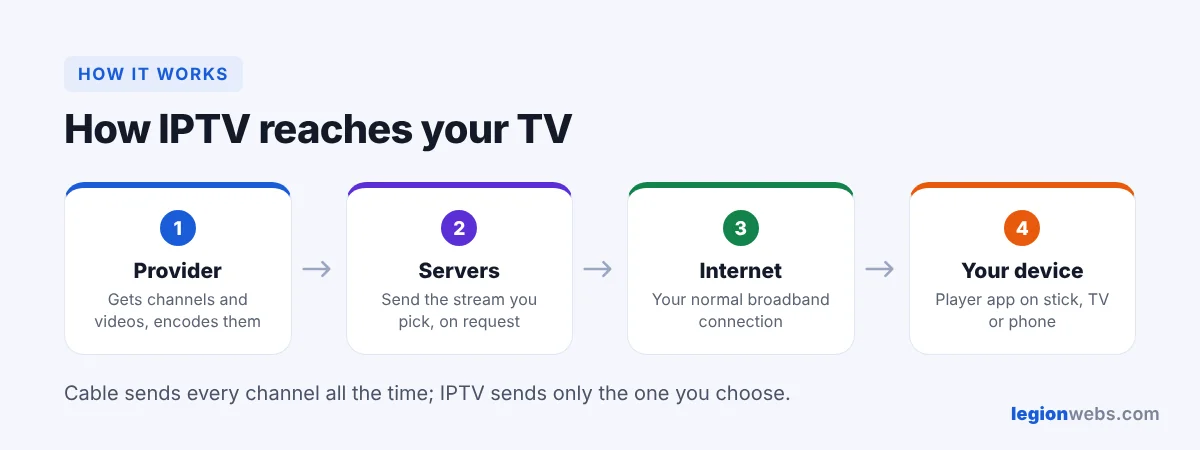
Unlike cable, which sends every channel down the wire all the time, IPTV only sends the channel you choose. As a result, it works over any good broadband connection, and you can watch on many devices.
What can you watch with IPTV?
| Type | What it means | Example |
|---|---|---|
| Live TV | Channels playing in real time | News, sports, entertainment channels |
| Catch-up (time-shift) | Replay programs that aired recently | Watch last night’s show this morning |
| Video on demand (VOD) | A library of movies and series | Start any episode whenever you want |
| Recording | Save a program to watch later | Only in some players and services |
Which channels and genres you get depends entirely on the service. Some focus on one country, others on sports or movies. Therefore, always check the channel list before you subscribe, ideally during a free trial.
IPTV picture quality: SD, HD and 4K
Most services stream in HD (720p or 1080p), and many offer some channels in 4K. However, the quality you actually see depends on three things: the service’s stream, your internet speed, and your device. For example, 4K needs a 4K TV, a 4K-capable device such as the Fire TV Stick 4K Max, and roughly 25 Mbps of steady speed. If streams stutter, see How to Fix IPTV Buffering.
What you need to watch Internet Protocol Television
- A device: a streaming stick, smart TV, Android box, phone or computer. See which devices support IPTV.
- An IPTV player app, such as TiviMate or IPTV Smarters. Compare them in Best IPTV App for Fire Stick.
- A subscription from an IPTV service, which gives you a login (see M3U vs Xtream Codes).
- Internet: about 10–15 Mbps per HD stream.
Is IPTV legal?
Internet Protocol Television as a technology is completely legal; big companies use it every day. What matters is whether the service has the rights to the channels it sells. Licensed services are legal to use. On the other hand, services that resell channels without permission are illegal in many countries, and they can disappear overnight with your money.
- Good signs: a real company name, clear terms, normal payment methods, and support you can contact.
- Warning signs: thousands of premium channels for a few dollars, payment only in crypto or gift cards, and no company details.
For a full checklist, read How to Choose an IPTV Service.
IPTV pros and cons
| Pros | Cons |
|---|---|
| Usually cheaper than cable | Needs a steady internet connection |
| Watch on TV, phone and laptop | Quality depends on the provider’s servers |
| Catch-up and on-demand libraries | Some services are not licensed |
| No installation visit or long contract | You set up the app yourself |
Wondering how it compares on price? See IPTV vs Cable TV.
For an example of how an IPTV service lists its plans, channels and supported devices, see 8K IPTV Group.
Frequently Asked Questions
What is Internet Protocol Television in simple words?
Internet Protocol Television is TV that comes through your internet connection instead of a cable or satellite dish.
Do I need a special box for IPTV?
No. A streaming stick, a smart TV app or even your phone is enough. A dedicated box is only one option.
Is IPTV the same as streaming?
Mostly, yes. People usually say IPTV for live TV channels over the internet, and streaming for apps like Netflix. Both use the internet to deliver video.
Are there exclusive channels on IPTV?
Each service chooses its own channel list, so some offer channels others do not. Compare the lists during a trial rather than trusting big numbers on a sales page.
What’s next
Now you know what Internet Protocol Television is. Next, compare costs in IPTV vs Cable TV, or jump straight to setup with IPTV on Firestick. Want to test a service? Start a free IPTV trial.