
Cloudflare Error 525: How to Fix SSL Handshake Failed (2026)
This guide may contain affiliate links. If you buy through them we may earn a commission at no extra cost to you. As an Amazon Associate I earn from qualifying purchases. Learn more.
Lessons 12 of 14
Quick Overview: Cloudflare error 525 means Cloudflare reached your web server but could not complete a secure (SSL/TLS) connection with it. It only happens when Cloudflare uses Full or Full (strict) mode. The usual cause is a missing or broken certificate on your server, sometimes exposed by a rule that forces Full mode. Fix the certificate (reinstall it, or install a free Cloudflare Origin Certificate), and use Flexible mode only as a short emergency workaround.
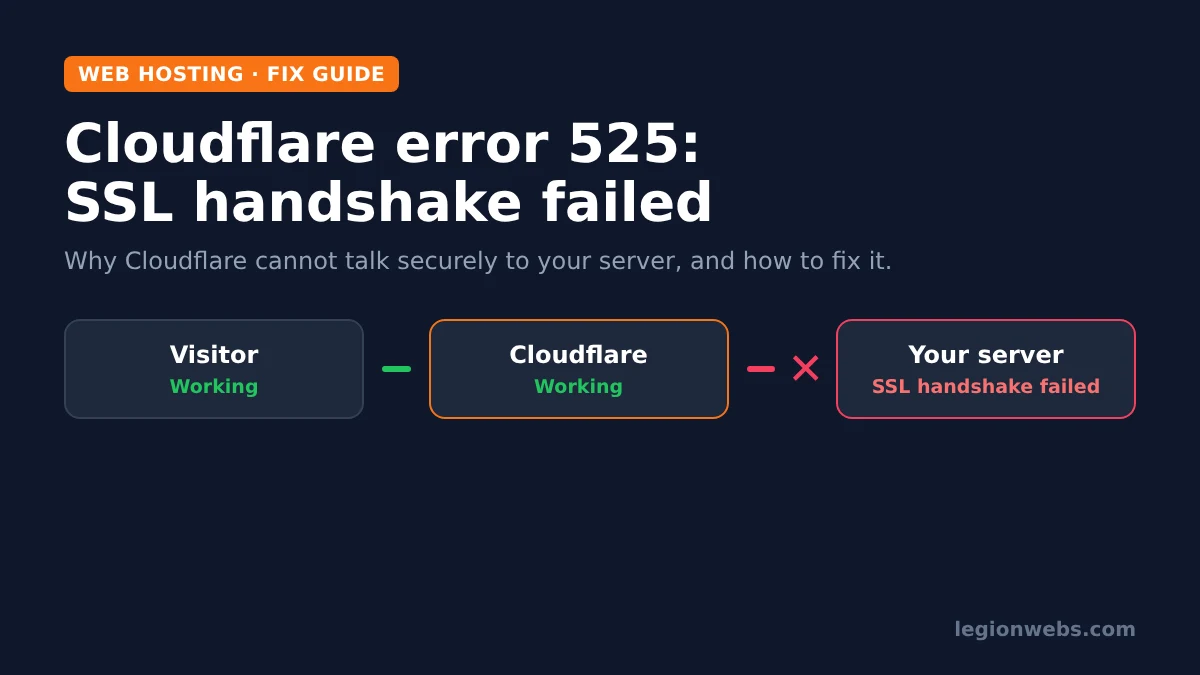
If your site suddenly shows a Cloudflare page titled “SSL handshake failed” with error code 525, visitors cannot reach any page. The error page itself shows the problem clearly: your browser and Cloudflare are working, but the connection between Cloudflare and your host fails.
We hit this exact error on legionwebs.com in October 2026, so this lesson follows the same steps we used to find the cause and bring the site back. It applies to any host, with notes for Hostinger users.
What you need
- Access to your Cloudflare dashboard for the domain
- Access to your hosting control panel (for example hPanel or cPanel)
- Your server’s IP address (shown in your hosting panel)
- About 15 to 30 minutes
What Cloudflare error 525 means
When your site uses Cloudflare’s proxy (the orange cloud), every visit makes two connections. First, the visitor connects to Cloudflare. Then, Cloudflare connects to your server, called the origin. Cloudflare’s SSL mode decides how that second connection works.
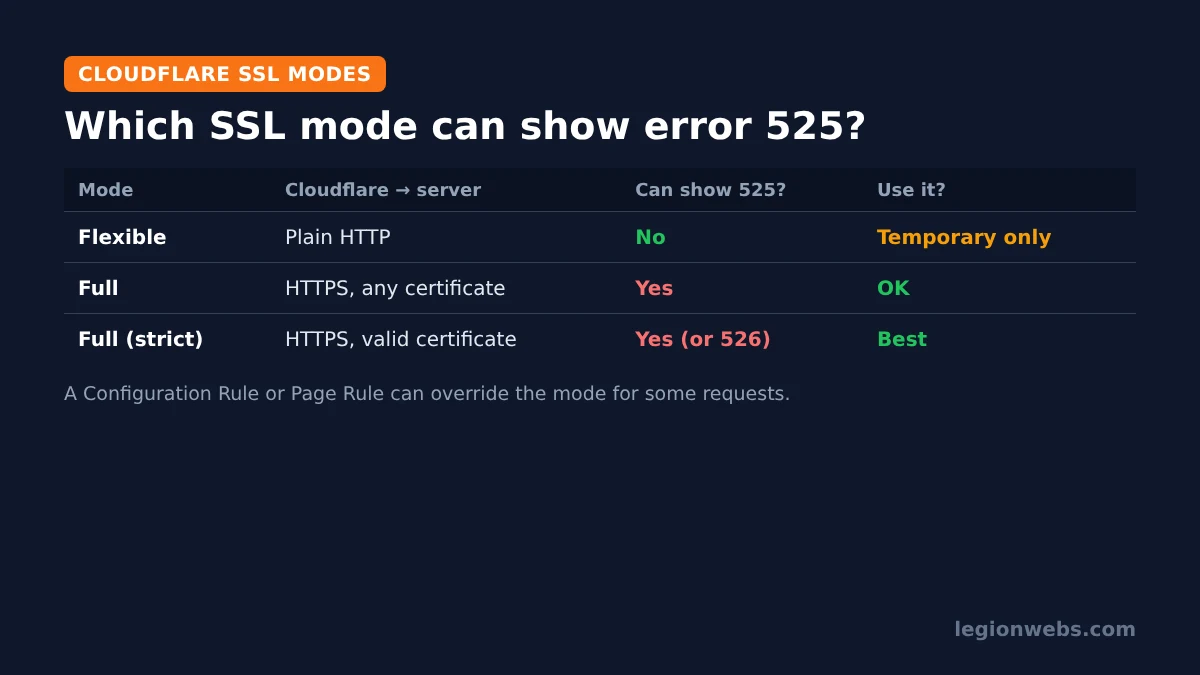
In Full and Full (strict) mode, Cloudflare talks to your server over HTTPS. If your server cannot complete that secure handshake, Cloudflare shows error 525. In Flexible mode, Cloudflare uses plain HTTP to your server, so error 525 cannot happen there. According to Cloudflare’s error 525 documentation, the common causes are a missing certificate, a closed port 443, no SNI support and mismatched cipher suites.
Common causes of Cloudflare error 525
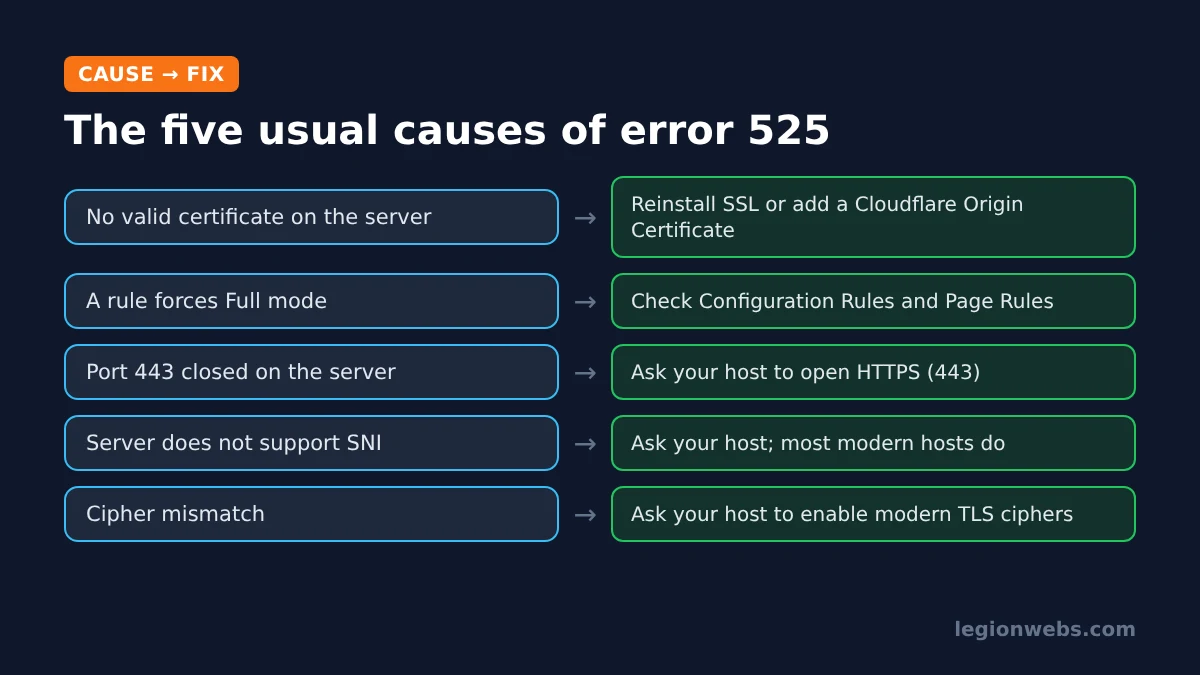
| Cause | How it shows up | Who fixes it |
|---|---|---|
| No valid certificate on the server | Most common; often after a failed renewal or a hosting change | You, in the hosting panel |
| A rule forces Full mode | SSL/TLS says Flexible, yet you still get 525 | You, in Cloudflare Rules |
| Port 443 closed | Server does not accept HTTPS at all | Your host |
| No SNI support | Rare on modern hosting | Your host |
| Cipher mismatch | Old server software | Your host |
| Origin IP changed | DNS points to an old server | You, in Cloudflare DNS |
Step 1: Check which SSL mode is really in use
- In Cloudflare, open your domain and go to SSL/TLS > Overview. Note the encryption mode.
- Next, go to Rules > Overview and look at Configuration Rules and Page Rules.
- Open any rule that changes “SSL”. A rule can set Full mode for some or all requests, even when the main setting says Flexible.
This is exactly what we found on our own site: the main setting was Flexible, but an old Configuration Rule called “always use https” set SSL to Full for every HTTPS request. Because the server’s certificate had stopped working, that rule turned a hidden problem into a full outage.
Step 2: Confirm the DNS record points to the right server
Go to DNS > Records and check that the A record for your domain matches the server IP shown in your hosting panel. If you moved hosts or your host changed servers, an old IP is enough to cause handshake errors. Update the record if needed and wait a few minutes.
Step 3: Test the certificate on your server
Your hosting panel may say the SSL certificate is “Active” even when the server is not serving it correctly. That happened in our case. To test the server directly, run this command on a computer with curl, replacing the domain and IP with your own:
curl -svo /dev/null https://example.com --connect-to ::203.0.113.10If the output shows an SSL error instead of a certificate for your domain, the problem is on the server. Consequently, the next step is to fix or replace the certificate.
Step 4: Fix Cloudflare error 525 by reinstalling or replacing the certificate
You have two good options:
- Reinstall your host’s free SSL: in your hosting panel, open the SSL section, remove the broken certificate and install it again. If the panel offers no reinstall option, ask support to reissue the certificate for your domain. Free certificates that renew through the domain can fail when Cloudflare sits in front, so mention that you use Cloudflare.
- Install a Cloudflare Origin Certificate: in Cloudflare, go to SSL/TLS > Origin Server and create a free origin certificate. Then install it in your hosting panel as a custom SSL certificate. It is trusted by Cloudflare for years and does not need renewing through your domain, which makes it the most reliable choice behind Cloudflare.
Hostinger users: the SSL page in hPanel lists your certificate with Uninstall and Force HTTPS options. If the certificate shows as active but the site still returns 525, contact Hostinger support and ask them to reinstall it, or install a Cloudflare Origin Certificate as custom SSL.
Step 5: Bring the site back quickly while you fix it
If you need the site online immediately, you can switch the connection to Flexible for a short time. Either change the SSL mode, or disable the rule that forces Full mode. That is what we did, and the site came back within seconds.
However, treat this as a temporary fix. Flexible mode sends traffic between Cloudflare and your server unencrypted. In addition, if your server forces HTTPS itself, Flexible mode can cause a “too many redirects” loop. Fix the certificate, then switch back to Full or Full (strict).
Step 6: Still seeing Cloudflare error 525? Ask your host
If the certificate is fine and the error remains, the cause is usually on the server side: port 443 closed, no SNI support, or old cipher settings. Send your host the error code, the time it happened and the Cloudflare Ray ID shown at the bottom of the error page. Also mention any CDN or security feature your host added, since a second CDN in front of the server can interfere with Cloudflare.
Error 525 vs 521, 522 and 526
| Error | Meaning | Typical fix |
|---|---|---|
| 521 | Server refused the connection | Check the server is running and not blocking Cloudflare IPs |
| 522 | Connection timed out | Server overloaded or firewall dropping requests |
| 525 | SSL handshake failed | Fix the server certificate or TLS settings |
| 526 | Invalid SSL certificate (Full strict) | Install a valid or Cloudflare Origin certificate |
Frequently Asked Questions
Is Cloudflare error 525 a problem with Cloudflare?
Almost never. The error page shows Cloudflare as “Working”. The failure is in the secure connection to your server, so the fix is on your server or in your SSL settings.
Will switching to Flexible mode fix error 525?
It hides the error, because Cloudflare stops using HTTPS to your server. Use it only for a short time, then fix the certificate and switch back to Full or Full (strict).
Does error 525 hurt my SEO?
A short outage rarely does lasting harm. However, if search engines see 5xx errors for days, they may crawl less and drop pages, so fix it quickly.
How long does a new certificate take to work?
A Cloudflare Origin Certificate works as soon as it is installed. A reissued host certificate usually takes a few minutes, depending on the host.
What’s next
- Compare control panels in cPanel vs hPanel.
- Moving to a new host? Follow how to migrate a website to a new host.
- Choosing hosting? Read how to choose web hosting.
Free download
Firestick + IPTV Setup Checklist
Two printable pages: install, login, the settings that make it faster and quick fixes for buffering and an empty guide.
We'll send occasional new guides. No spam, unsubscribe any time. Privacy
We recommend Hostinger for beginners: affordable plans, free SSL, one-click WordPress install and 24/7 support.
Get started with Hostinger →