
What is cloud hosting?
This guide may contain affiliate links. If you buy through them we may earn a commission at no extra cost to you. As an Amazon Associate I earn from qualifying purchases. Learn more.
Lessons 4 of 11
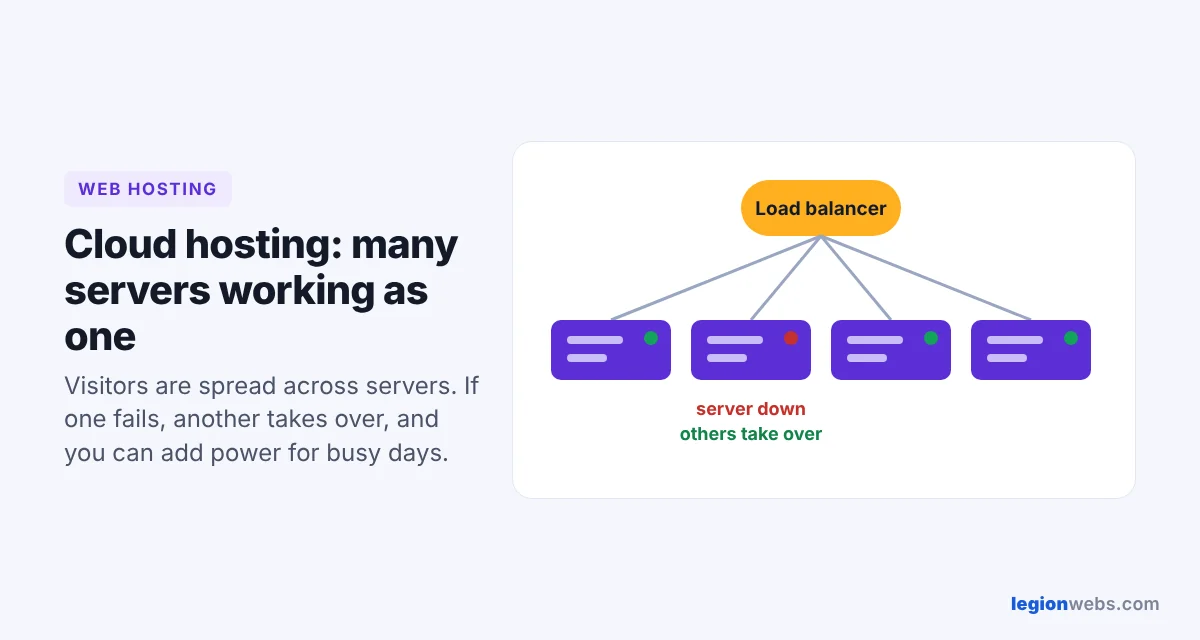
Quick Overview: Cloud hosting runs your website on a network of connected servers instead of one machine. If one server has a problem, another takes over, and you can add power within minutes when traffic grows. It is a good fit for sites whose traffic goes up and down.
Many beginners hear “the cloud” and assume it is only for big tech companies. In fact, cloud hosting is now available at prices close to regular hosting, and it can make a small site faster and more reliable. Here is how it works and when it is the right choice.
How cloud hosting works
Your website files and database are stored and served across a cluster of servers, often in several data centers. A load balancer sends each visitor to a server with spare capacity. When your traffic rises, the provider can add more computing resources to your site; when it falls, it can scale back. You can learn more in this introduction to cloud computing.
Picture a taxi company instead of a single car. If one car breaks down, another picks you up, and on a busy night the company sends more cars.
Cloud vs shared vs VPS hosting
| Shared | VPS | Cloud | |
|---|---|---|---|
| Runs on | One server, shared | A slice of one server | Many connected servers |
| If a server fails | Site goes down | Site goes down | Another server takes over |
| Handling traffic spikes | Weak | Good, within plan limits | Best, can scale quickly |
| Pricing | Lowest fixed price | Fixed monthly price | Fixed plans or pay-as-you-go |
| Best for | New small sites | Steady growing sites | Sites with changing or seasonal traffic |
Compare it with shared hosting and VPS hosting if you are still deciding.
Benefits of cloud hosting
- High uptime: no single server can take your site offline.
- Easy scaling: add resources for a product launch or sale, then scale down.
- Speed: many cloud plans include caching and a CDN that serve pages from locations near your visitors.
- Flexible billing: some providers charge only for what you use.
Drawbacks to know about
- Pay-as-you-go bills can be hard to predict if traffic jumps suddenly.
- Big cloud platforms (AWS, Google Cloud, Azure) are powerful but complex for beginners.
- You still need backups: redundancy protects against hardware failure, not against deleting your own files.
Is cloud hosting right for you?
Choose it if your traffic is unpredictable, you run campaigns or seasonal sales, or downtime would cost you money. If you are launching a new blog with low traffic, shared hosting is enough for now.
How to choose a cloud hosting plan
- Prefer a managed cloud plan with a simple dashboard if you are not a developer.
- Check the included RAM, CPU and storage, and how quickly you can upgrade.
- Look for a free CDN, daily backups and free SSL.
- Check where the data centers are and pick one near your audience.
- Read how billing works so there are no surprises.
Beginner-friendly managed cloud plans from Hostinger include a control panel, backups and one-click WordPress.
Frequently Asked Questions
Is cloud hosting faster than shared hosting?
Usually yes. Your site gets more reserved resources and often a CDN, so pages load faster, especially when traffic is high.
Is cloud hosting expensive?
Not necessarily. Managed cloud plans for small businesses cost more than shared hosting but less than dedicated servers. Large cloud platforms bill by usage, which can be cheap or expensive depending on traffic.
Do I need technical skills for cloud hosting?
Not with a managed plan. The provider handles the servers; you manage your website as usual.
What’s next
Next, learn what managed hosting includes and why it saves beginners time.
We recommend Hostinger for beginners: affordable plans, free SSL, one-click WordPress install and 24/7 support.
Get started with Hostinger →