
What Is Disk Space and Bandwidth in Web Hosting?
This guide may contain affiliate links. If you buy through them we may earn a commission at no extra cost to you. As an Amazon Associate I earn from qualifying purchases. Learn more.
Lessons 7 of 11
Quick Overview: Disk space is the amount of storage your hosting plan gives you for your website files, database, emails and backups. Most small websites need far less than hosting companies advertise. This lesson shows what uses storage, how much you really need and how to keep usage low.
Hosting plans list storage in gigabytes (GB), and it is easy to assume bigger is always better. In practice, the type of storage and how you manage your files matter more than the raw number. Here is how to read that number on a hosting plan.
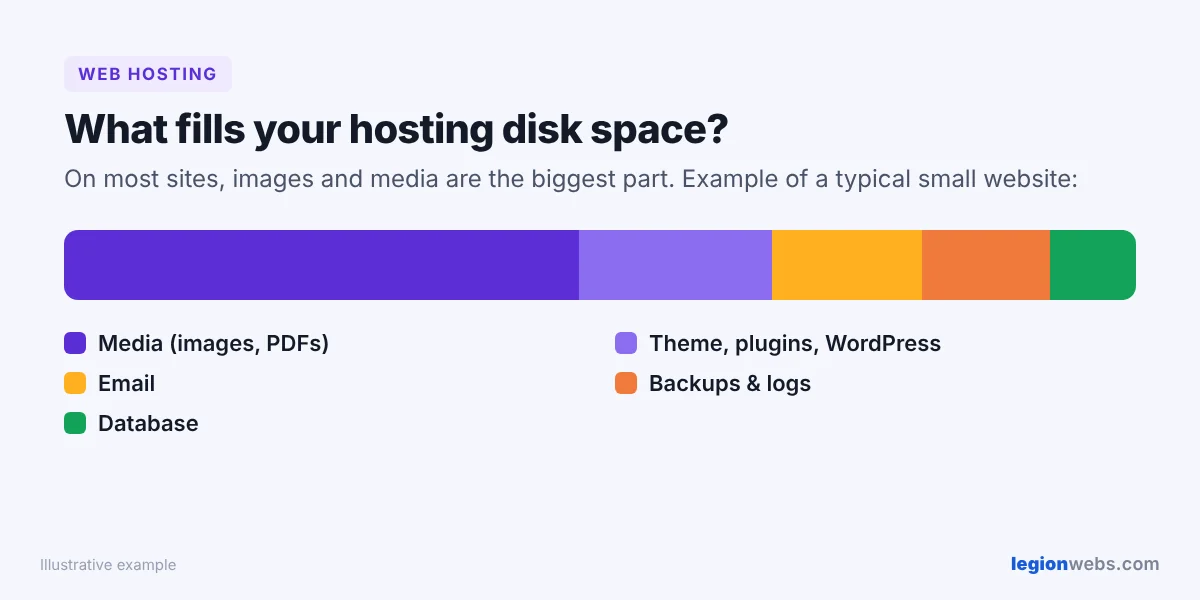
What uses disk space on a website
- Website files: WordPress itself, your theme and plugins. A fresh WordPress install is well under 100 MB.
- Media: images, PDFs and videos. This is usually the biggest part.
- Database: your posts, pages, settings and comments, stored as text. Usually small.
- Email accounts: if your email is hosted on the same plan, every inbox counts.
- Backups and logs: old backups saved on the server can quietly fill your space.
How much disk space do you need?
| Type of website | Typical storage used |
|---|---|
| New blog or business site | Under 1–2 GB |
| Blog with a few hundred posts and images | 2–5 GB |
| Online store with many product photos | 5–20 GB |
| Video-heavy site hosting its own videos | Much more, consider external video hosting |
These are rough guides. Check your own usage in your hosting control panel (look for “Disk usage”) and choose a plan with comfortable room to grow, about double what you use today.
SSD and NVMe storage: why the type matters
Older plans used hard disk drives (HDD). Modern hosts use SSD or, even faster, NVMe drives. Faster storage means your pages and database queries load quicker, which helps both visitors and SEO. A plan with less space on NVMe is often better than a plan with more space on old drives.
What “unlimited disk space” really means
Some shared plans advertise unlimited storage. There is usually a fair-use policy: you can store your website, but not use the server as a backup drive or file-sharing service. Read the terms, and look at limits on inodes (the number of files), which some hosts cap even when storage is unlimited.
Disk space vs bandwidth
Storage is how much you can keep on the server. Bandwidth is how much data can be sent to visitors each month. They are different limits; read our lesson on bandwidth in web hosting to understand the second one.
How to save disk space
- Compress images before or after upload (this site uses Imagify to convert images to WebP).
- Host videos on YouTube or Vimeo and embed them instead of uploading files.
- Delete unused themes and plugins.
- Store backups off the server, for example in cloud storage.
- Empty the spam and trash folders in your email accounts.
- Remove old media you no longer use.
If you are choosing a plan, beginner plans from Hostinger use fast NVMe storage and are easy to upgrade later. You can also check the official WordPress hosting requirements before you decide.
Frequently Asked Questions
What happens if I run out of disk space?
You may be unable to upload files, install updates or receive email, and some features may break. Free up space or upgrade your plan before you hit the limit.
Does disk space affect website speed?
The amount does not, but the type does. Fast SSD or NVMe storage loads pages quicker than old hard drives.
How do I check my current usage?
Log in to your hosting control panel and look for “Disk usage” or “Storage”. It shows how much you use and what is taking the most room.
What is bandwidth in web hosting?
Bandwidth (or monthly data transfer) is the amount of data your site can send to visitors each month. Every page view downloads text, images and code, so more visitors and bigger images use more bandwidth. A small blog uses very little, while a busy site with large images or video needs much more. Many plans advertise “unmetered” bandwidth, which still has a fair-use limit, so check the terms. To compare plans, see How to Choose a Web Hosting Provider.
What’s next
Continue with what cPanel is and why hosts use it, or see how much web hosting costs.
We recommend Hostinger for beginners: affordable plans, free SSL, one-click WordPress install and 24/7 support.
Get started with Hostinger →