
What is VPS hosting?
This guide may contain affiliate links. If you buy through them we may earn a commission at no extra cost to you. As an Amazon Associate I earn from qualifying purchases. Learn more.
Lessons 3 of 11
Quick Overview: VPS hosting gives your website its own reserved share of a powerful server: guaranteed memory, processing power and storage that no other customer can use. It sits between cheap shared hosting and expensive dedicated servers, and it is the usual next step when a growing site outgrows shared hosting.
If your website has started to feel slow at busy times, or your host keeps warning you about resource limits, a virtual private server is probably the upgrade you are looking for. This lesson explains what VPS hosting is, how it works, and how to tell whether you actually need it.
How VPS hosting works
A hosting company takes one physical server and splits it into several isolated virtual machines using software called a hypervisor. Each virtual machine behaves like a separate computer with its own operating system, its own fixed amount of RAM and CPU, and its own storage. You can read the technical background in this overview of virtual private servers.
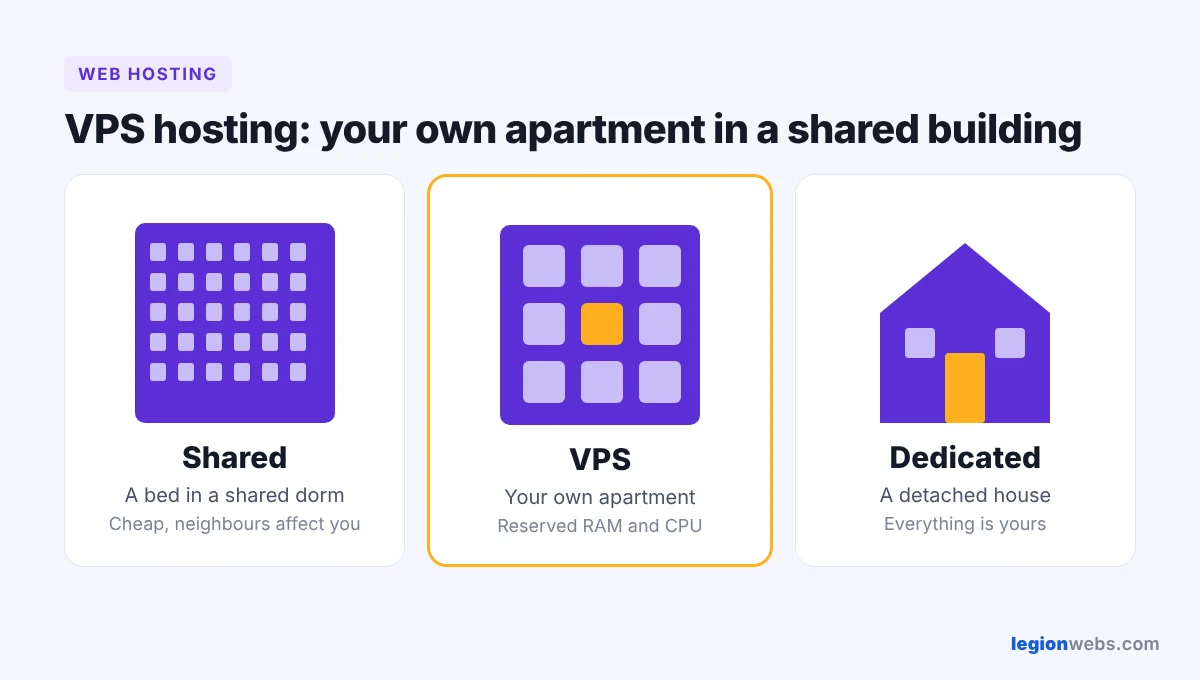
Think of it like an apartment building. On shared hosting you rent a bed in a shared dorm: cheap, but a noisy neighbour affects everyone. With a VPS you rent your own apartment in the building: the walls are shared, but your space, your keys and your resources are yours.
VPS vs shared vs dedicated hosting
| Shared | VPS | Dedicated | |
|---|---|---|---|
| Resources | Shared with hundreds of sites | Reserved for you | The whole server is yours |
| Performance | Can drop when neighbours are busy | Stable and predictable | Highest |
| Control | Limited, no root access | Full root access | Full control |
| Skill needed | Beginner | Intermediate (or choose managed) | Advanced |
| Best for | New blogs and small sites | Growing sites, stores, apps | Very large, high-traffic sites |
Not sure where you are? Start with shared hosting, then read about dedicated hosting to see the full picture.
Managed vs unmanaged VPS
- Unmanaged: you get a bare server and handle setup, security updates and backups yourself. Cheaper, but only if you are comfortable with Linux.
- Managed: the host takes care of updates, security and often gives you a control panel. A little more expensive, much less work. If you have never used a command line, choose managed.
Signs you need a virtual private server
- Your site slows down or shows errors during traffic peaks.
- Your host warns you about CPU or memory limits.
- You run an online store, a membership site or an app that needs steady performance.
- You need to install custom software or change server settings that shared hosting blocks.
- You host several busy websites and want them on one controlled environment.
Pros and cons
| Pros | Cons |
|---|---|
| Guaranteed RAM and CPU | Costs more than shared hosting |
| Faster and more stable under load | Unmanaged plans need technical skills |
| Root access and custom software | You are responsible for more of the security |
| Easy to upgrade as you grow | Overkill for a brand-new small site |
How to choose a VPS plan
- Start with at least 2 GB of RAM and 1–2 CPU cores for a typical WordPress site.
- Pick fast NVMe or SSD storage.
- Choose a data center close to most of your visitors.
- Check that automatic backups and a firewall are included.
- If you are not technical, pick a managed plan with a simple control panel.
- Make sure you can upgrade RAM and CPU later without moving your site.
For beginners we like Hostinger because its VPS plans come with a simple control panel and can be upgraded as your site grows.
Frequently Asked Questions
Is VPS hosting good for beginners?
It can be, if you choose a managed plan. Unmanaged servers expect you to handle updates and security from the command line, which is hard for beginners.
Can I move from shared hosting to a VPS later?
Yes. Most hosts can migrate your site for you, and the move usually takes less than a day. Starting on shared hosting and upgrading when you need it is a sensible plan.
Do I need a VPS for WordPress?
Not for a new blog. Shared hosting is fine at the start. Consider a VPS once you get steady traffic, sell products online, or notice slowdowns.
What’s next
Next, learn about dedicated hosting, the option for the very largest websites, or compare all options in the different types of web hosting.
We recommend Hostinger for beginners: affordable plans, free SSL, one-click WordPress install and 24/7 support.
Get started with Hostinger →