
What Is a VPN? How a VPN Works, Explained Simply
This guide may contain affiliate links. If you buy through them we may earn a commission at no extra cost to you. As an Amazon Associate I earn from qualifying purchases. Learn more.
Lessons 1 of 4
Quick Overview: A VPN (virtual private network) sends your internet traffic through an encrypted tunnel to a server run by the VPN company. This lesson explains how a VPN works in plain words, what it protects, what it does not do, and when it is worth paying for one on your phone, laptop or Fire TV.
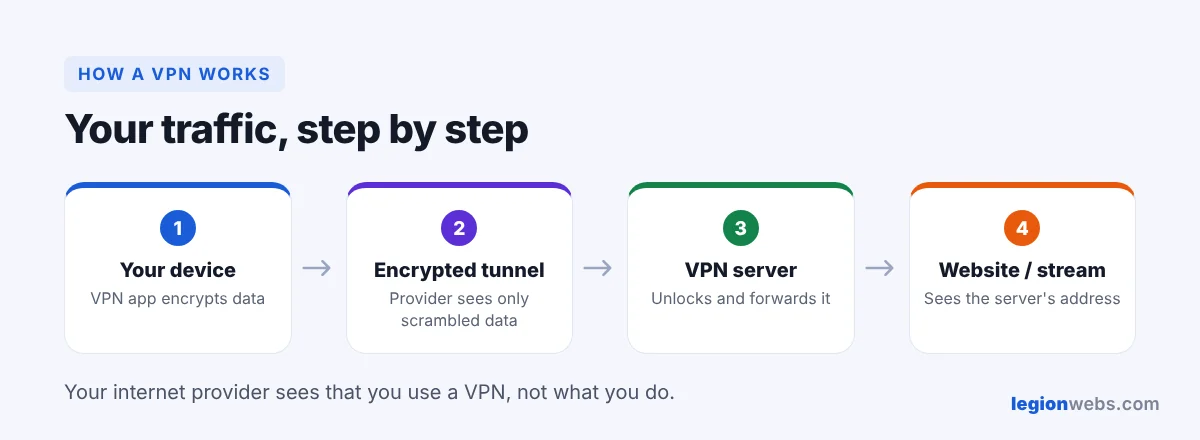
Normally, everything you do online passes through your internet provider in a way it can see and log. A VPN changes that. Instead of going straight to a website or streaming server, your traffic first travels, encrypted, to a VPN server. From there it continues to the internet. As a result, your provider only sees a connection to a VPN, and the website only sees the VPN server’s address.
How a VPN works, step by step
- You connect: first, you open the VPN app and pick a server, for example in your own country.
- The app builds the tunnel: next, the app and the server agree on encryption keys. From now on, the app scrambles your data before it leaves your device.
- Your traffic travels through the tunnel: your internet provider still carries the data, but it cannot read it or see which sites and apps you use.
- The VPN server forwards it: finally, the server sends your request to the website and passes the answer back to you through the tunnel.
What a VPN hides, and from whom
| Who | Without a VPN | With a VPN |
|---|---|---|
| Your internet provider | Sees which sites and services you use | Only knows that you use a VPN |
| Websites and apps | See your real IP address and rough location | Get the VPN server’s address instead |
| Others on public Wi-Fi | May see unencrypted traffic | See only scrambled data |
| The VPN company | — | Could see your traffic, so choose one with an audited no-logs policy |
How a VPN works in everyday life
- Privacy at home: your provider can no longer build a log of what you watch and browse.
- Public Wi-Fi: in hotels, airports and cafés, the tunnel protects your logins from people on the same network.
- Avoiding throttling: some providers slow down video at busy times. Because the VPN encrypts the traffic, they cannot single it out. See how to fix IPTV buffering.
- Travel: connect to a server in your home country to reach your usual services while you are abroad, within each service’s terms.
What a VPN does not do
A VPN is a privacy tool, not a magic shield. In particular, it does not:
- make illegal streams or downloads legal; always use licensed services;
- stop companies from tracking you once you sign in to Google, Facebook or Amazon;
- protect you from viruses or phishing on its own, although some VPNs add ad and malware blocking;
- make your internet faster than your plan, although it can help when your provider throttles video.
How to choose a VPN that works for you
- Audited no-logs policy: look for an independent audit, not just a promise.
- Modern protocol: WireGuard-based protocols, such as NordLynx, are fast and light on small devices.
- Apps for your devices: including Fire TV. Newer Vega OS sticks need a VPN with a Vega OS app; see Vega OS Fire TV explained.
- Enough devices: most paid plans cover around 10 devices at once, and some have no limit.
- Money-back guarantee: so you can test it on your own connection.
We compare the main options in Best VPN for Firestick. If you just want a well-known choice that has apps for both Fire OS and Vega OS, NordVPN is a common pick.
How a free VPN works compared with a paid one
Most free VPNs pay for themselves with ads, data caps or by selling usage data, which defeats the purpose. There are exceptions: for example, Proton VPN’s free plan has no data limit, but it covers one device and fewer servers. For daily streaming, a paid plan is usually the better deal.
Frequently Asked Questions
Is using a VPN legal?
In most countries, yes. However, a few countries restrict VPNs, and anything that is illegal without a VPN is still illegal with one.
How does a VPN work with my internet speed?
It slows it down a little, because data takes a longer route and the app encrypts it. With a nearby server and a modern protocol, most people do not notice it while streaming.
Should I keep the VPN on all the time?
For privacy, yes. Most apps have an auto-connect option, so the VPN starts on its own when the device turns on.
What’s next
Now that you know how a VPN works, set one up on your TV with How to Install a VPN on Firestick, then learn when it helps your streams in VPN for IPTV.