
Fire TV Stick 4K Max vs 4K Select: Which Should You Buy? (2026)
This guide may contain affiliate links. If you buy through them we may earn a commission at no extra cost to you. As an Amazon Associate I earn from qualifying purchases. Learn more.
Lessons 1 of 6
Quick Overview: Fire TV Stick 4K Max vs 4K Select comes down to one question: do you want to install apps from outside the Amazon Appstore, such as IPTV players? The 4K Max runs Fire OS and can; the cheaper 4K Select runs Vega OS and cannot. The Max also has twice the memory and storage, Wi-Fi 6E and Dolby Vision. This lesson compares them side by side and helps you choose in one minute.
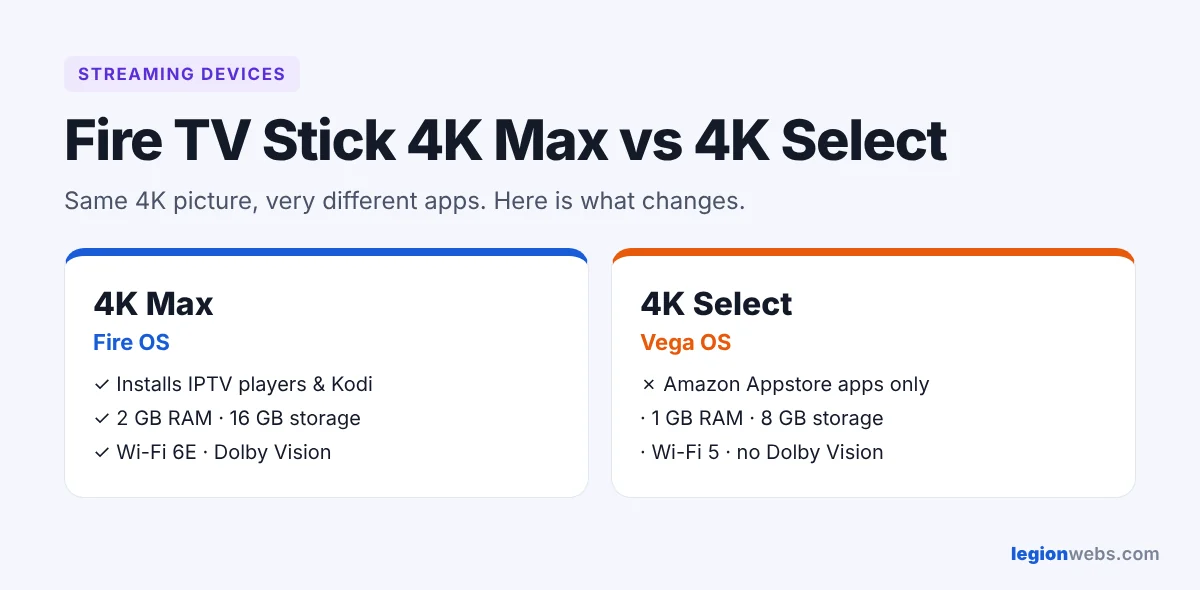
At first glance, both sticks stream 4K and look almost the same in the box. However, they run different operating systems, and that changes what you can do with them. Unfortunately, many buyers only find out after setup that their new 4K Select cannot install TiviMate, IPTV Smarters or Downloader. So read this first, and you will buy the right one.
The biggest difference: Fire OS vs Vega OS
The 4K Max runs Fire OS, which is based on Android. As a result, you can install apps from the Amazon Appstore and also from trusted websites using the Downloader app. This is how most IPTV players get onto a Fire TV.
The 4K Select runs Vega OS, Amazon’s newer Linux-based system. In contrast, it only installs apps from the Amazon Appstore. As a result, Downloader, TiviMate, IPTV Smarters, Kodi and other sideloaded apps do not work, and there is no setting to change that.
New in 2026: Amazon also sells a plain Fire TV Stick 4K (newest model) with a new remote and Wi-Fi 6. Its product page states that it only installs apps from the Amazon Appstore, so for IPTV players it has the same limit as the 4K Select. If you want to sideload apps, look for “4K Max” or “4K Plus” in the name before you buy.
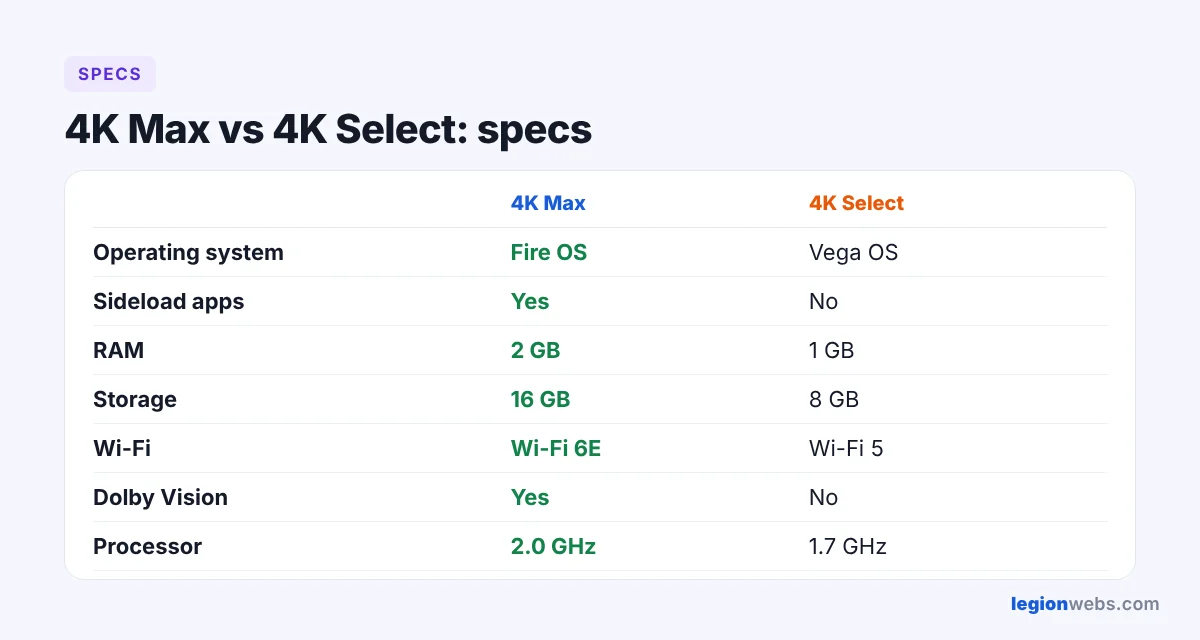
Fire TV Stick 4K Max vs 4K Select: specs compared
| Fire TV Stick 4K Max (2nd gen) | Fire TV Stick 4K Select | |
|---|---|---|
| Operating system | Fire OS | Vega OS |
| Install apps outside the Appstore | Yes | No |
| Processor | Quad-core, 2.0 GHz | Quad-core, 1.7 GHz |
| Memory (RAM) | 2 GB | 1 GB |
| Storage | 16 GB | 8 GB |
| Wi-Fi | Wi-Fi 6E | Wi-Fi 5 |
| Dolby Vision | Yes | No |
| HDR10+ and HLG | Yes | Yes |
| Dolby Atmos | Yes | Limited |
| Xbox Cloud Gaming | Yes | Not listed |
| Price | Higher | Lower |
For reference, specs are based on Amazon’s listings and the comparison by Cord Busters. Prices change often, especially during sales, so always check the current price: 4K Max and 4K Select.
4K Max vs 4K Select: speed and everyday use
With twice the memory, the 4K Max opens apps faster and switches between them without reloading. This matters for IPTV because large playlists and TV guides use a lot of memory. In addition, the extra storage means you can keep more apps installed before the stick slows down.
Wi-Fi is another big gap. Wi-Fi 6E on the 4K Max can use the less crowded 6 GHz band if your router supports it. The 4K Select uses older Wi-Fi 5, which is fine for most homes but less steady in busy apartment buildings. In any case, an Ethernet adapter gives the most stable connection.
Picture and sound
To begin with, both sticks play 4K with HDR10+ and HLG. However, only the 4K Max supports Dolby Vision, which many newer TVs and Netflix or Disney+ titles use. So if your TV supports Dolby Vision, the Max shows those titles as intended. Similarly, for home cinema sound, the Max is also the safer choice for Dolby Atmos.
Apps on the 4K Max vs 4K Select
| App | 4K Max (Fire OS) | 4K Select (Vega OS) |
|---|---|---|
| Netflix, Prime Video, Disney+, YouTube | Yes | Yes |
| Downloader | Yes | No |
| TiviMate, IPTV Smarters Pro | Yes | No |
| Kodi | Yes | No |
| VPN apps | Yes, all major VPNs | Some, starting with NordVPN |
Mainstream streaming apps work on both. Instead, the difference is everything outside the Appstore, plus a smaller choice of VPNs on Vega OS. For VPN setup, see How to Install a VPN on Firestick.
4K Max or 4K Select: which should you buy?
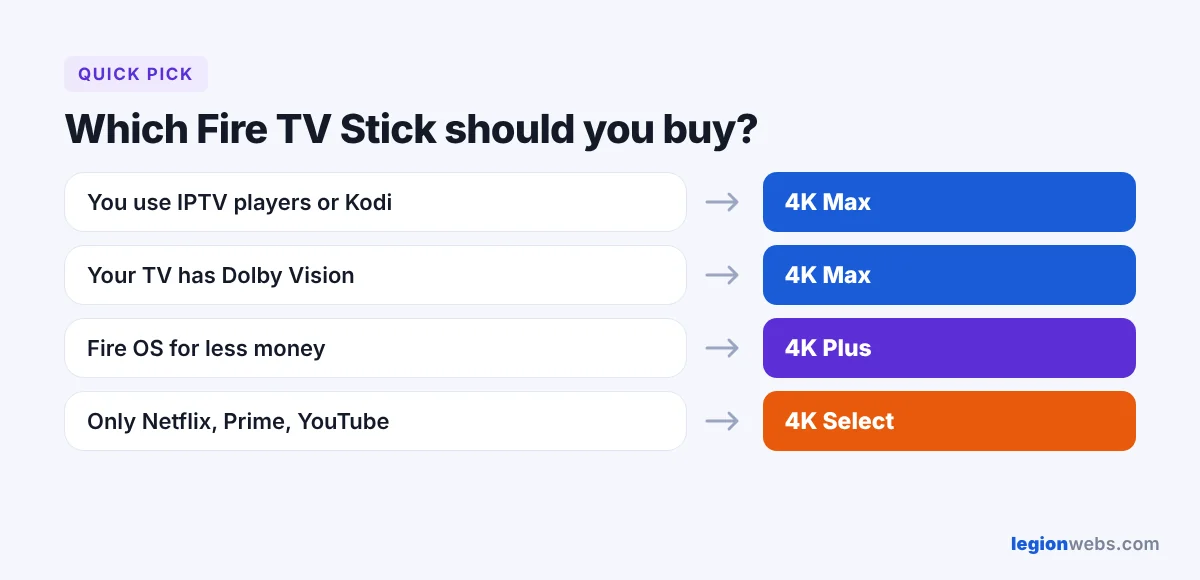
- Buy the 4K Max if you use IPTV players, Kodi or other apps from outside the Appstore, if your TV has Dolby Vision, or if you want the fastest stick that will stay useful for years.
- Buy the 4K Select if you only watch the big apps such as Netflix, Prime Video and YouTube, and you want to spend less.
- In between: the Fire TV Stick 4K Plus also runs Fire OS with 2 GB of memory, and costs less than the Max.
How to check which stick you have
Go to Settings → My Fire TV → About. First, the top line shows the device name. Then, if the software version says Fire OS, you can sideload apps. But if it only says OS with a version starting with 1 or 2, your device runs Vega OS.
Frequently Asked Questions
Can I install IPTV apps on the Fire TV Stick 4K Select?
Only partly. You can use IPTV apps that are listed in the Amazon Appstore for Vega OS. However, popular players such as TiviMate and IPTV Smarters Pro are installed with Downloader, which the 4K Select does not support.
Is the 4K Max worth the extra money?
For IPTV users, yes. After all, it is the only one of the two that installs the best players, and its extra memory makes large playlists run smoothly.
Can the new Fire TV Stick 4K install IPTV apps?
Only apps from the Amazon Appstore. Like the 4K Select, the newest Fire TV Stick 4K blocks sideloading, so Downloader, TiviMate and IPTV Smarters Pro will not install.
Can I switch the 4K Select to Fire OS?
No. Unfortunately, the operating system is fixed, and there is no official way to change it.
Which Fire TV Stick is best for IPTV?
The 4K Max, followed by the 4K Plus. That is because both run Fire OS, so they support every player in our Best IPTV App for Fire Stick guide.
What’s next
Got your stick? Start the setup track with How to Install Downloader on Fire Stick, then add a player and keep streams smooth with our buffering fixes.